 Luna Appointment Booking/Set up Luna Booking
Hi Truong!👋
Welcome to Luna Appointment Booking
Storefront status
Total appointments
1Lifetime revenue
$20.00Avada Appointment
Turn on the app embedOff
Without it, the Schedule button and booking popup won’t show on your store.

How to turn it on
- 1Open the theme editor — we go straight to App embeds
- 2Turn on Luna Booking
- 3Click Save, then come back and check again
Need help?
Avada Appointment
Turn on the app embedOn
Without it, the Schedule button and booking popup won’t show on your store.
How to turn it on
- 1Open the theme editor — we go straight to App embeds
- 2Turn on Luna Booking
- 3Click Save, then come back and check again
Need help?
Avada Appointment
Add the Schedule buttonNot added
Customers click it on your product page to book.
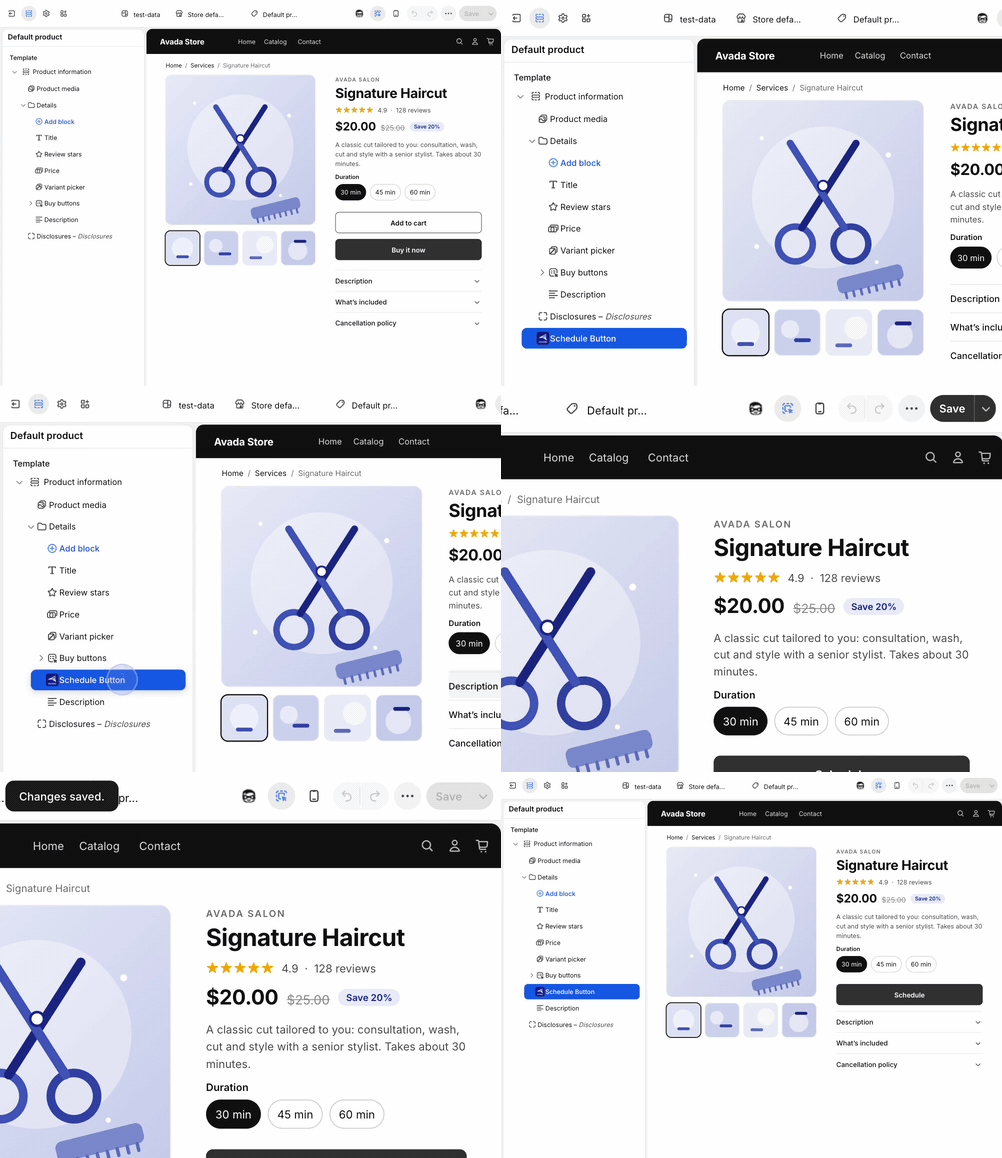
How to add it
- 1Open the theme editor — the button is already added
- 2Move it where you like, then click Save
- 3Come back and check again
Need help?
Avada Appointment
Add the Schedule buttonActive
Customers click it on your product page to book.
How to add it
- 1Open the theme editor — the button is already added
- 2Move it where you like, then click Save
- 3Come back and check again
Need help?
Avada Appointment
Add the Schedule buttonNot added
Customers click it on your product page to book.
How to add it
- 1Open the theme editor — the button is already added
- 2Move it where you like, then click Save
- 3Come back and check again
Need help?
Avada Appointment
Your theme needs a code snippet
Older themes don’t support app blocks. We can add the snippet for you, free.
<div class="Avada-Booking" style="display: block;"></div>Paste it above Add to cart in your product template.Need help?
Avada Appointment
Create your first service
A service is what customers book. You can change it anytime.
Product
Appointment TestNeed help?
Avada Appointment
Create your first service
A service is what customers book. You can change it anytime.
Product
Need help?
Avada Appointment
Set up business hours
Set your regular business hours for each day of the week. You can change them anytime in Settings.
-
Monday 06:00 AM 06:30 AM 07:00 AM 07:30 AM 08:00 AM 08:30 AM 09:00 AM 09:30 AM 10:00 AM 10:30 AM 11:00 AM 11:30 AM 12:00 PM 12:30 PM 01:00 PM 01:30 PM 02:00 PM 02:30 PM 03:00 PM 03:30 PM 04:00 PM 04:30 PM 05:00 PM 05:30 PM 06:00 PM 06:30 PM 07:00 PM 07:30 PM 08:00 PM 08:30 PM 09:00 PM 09:30 PM 10:00 PM 06:00 AM 06:30 AM 07:00 AM 07:30 AM 08:00 AM 08:30 AM 09:00 AM 09:30 AM 10:00 AM 10:30 AM 11:00 AM 11:30 AM 12:00 PM 12:30 PM 01:00 PM 01:30 PM 02:00 PM 02:30 PM 03:00 PM 03:30 PM 04:00 PM 04:30 PM 05:00 PM 05:30 PM 06:00 PM 06:30 PM 07:00 PM 07:30 PM 08:00 PM 08:30 PM 09:00 PM 09:30 PM 10:00 PM 06:00 AM 06:30 AM 07:00 AM 07:30 AM 08:00 AM 08:30 AM 09:00 AM 09:30 AM 10:00 AM 10:30 AM 11:00 AM 11:30 AM 12:00 PM 12:30 PM 01:00 PM 01:30 PM 02:00 PM 02:30 PM 03:00 PM 03:30 PM 04:00 PM 04:30 PM 05:00 PM 05:30 PM 06:00 PM 06:30 PM 07:00 PM 07:30 PM 08:00 PM 08:30 PM 09:00 PM 09:30 PM 10:00 PM 06:00 AM 06:30 AM 07:00 AM 07:30 AM 08:00 AM 08:30 AM 09:00 AM 09:30 AM 10:00 AM 10:30 AM 11:00 AM 11:30 AM 12:00 PM 12:30 PM 01:00 PM 01:30 PM 02:00 PM 02:30 PM 03:00 PM 03:30 PM 04:00 PM 04:30 PM 05:00 PM 05:30 PM 06:00 PM 06:30 PM 07:00 PM 07:30 PM 08:00 PM 08:30 PM 09:00 PM 09:30 PM 10:00 PM Closed -
Tuesday 06:00 AM 06:30 AM 07:00 AM 07:30 AM 08:00 AM 08:30 AM 09:00 AM 09:30 AM 10:00 AM 10:30 AM 11:00 AM 11:30 AM 12:00 PM 12:30 PM 01:00 PM 01:30 PM 02:00 PM 02:30 PM 03:00 PM 03:30 PM 04:00 PM 04:30 PM 05:00 PM 05:30 PM 06:00 PM 06:30 PM 07:00 PM 07:30 PM 08:00 PM 08:30 PM 09:00 PM 09:30 PM 10:00 PM 06:00 AM 06:30 AM 07:00 AM 07:30 AM 08:00 AM 08:30 AM 09:00 AM 09:30 AM 10:00 AM 10:30 AM 11:00 AM 11:30 AM 12:00 PM 12:30 PM 01:00 PM 01:30 PM 02:00 PM 02:30 PM 03:00 PM 03:30 PM 04:00 PM 04:30 PM 05:00 PM 05:30 PM 06:00 PM 06:30 PM 07:00 PM 07:30 PM 08:00 PM 08:30 PM 09:00 PM 09:30 PM 10:00 PM 06:00 AM 06:30 AM 07:00 AM 07:30 AM 08:00 AM 08:30 AM 09:00 AM 09:30 AM 10:00 AM 10:30 AM 11:00 AM 11:30 AM 12:00 PM 12:30 PM 01:00 PM 01:30 PM 02:00 PM 02:30 PM 03:00 PM 03:30 PM 04:00 PM 04:30 PM 05:00 PM 05:30 PM 06:00 PM 06:30 PM 07:00 PM 07:30 PM 08:00 PM 08:30 PM 09:00 PM 09:30 PM 10:00 PM 06:00 AM 06:30 AM 07:00 AM 07:30 AM 08:00 AM 08:30 AM 09:00 AM 09:30 AM 10:00 AM 10:30 AM 11:00 AM 11:30 AM 12:00 PM 12:30 PM 01:00 PM 01:30 PM 02:00 PM 02:30 PM 03:00 PM 03:30 PM 04:00 PM 04:30 PM 05:00 PM 05:30 PM 06:00 PM 06:30 PM 07:00 PM 07:30 PM 08:00 PM 08:30 PM 09:00 PM 09:30 PM 10:00 PM Closed -
Wednesday 06:00 AM 06:30 AM 07:00 AM 07:30 AM 08:00 AM 08:30 AM 09:00 AM 09:30 AM 10:00 AM 10:30 AM 11:00 AM 11:30 AM 12:00 PM 12:30 PM 01:00 PM 01:30 PM 02:00 PM 02:30 PM 03:00 PM 03:30 PM 04:00 PM 04:30 PM 05:00 PM 05:30 PM 06:00 PM 06:30 PM 07:00 PM 07:30 PM 08:00 PM 08:30 PM 09:00 PM 09:30 PM 10:00 PM 06:00 AM 06:30 AM 07:00 AM 07:30 AM 08:00 AM 08:30 AM 09:00 AM 09:30 AM 10:00 AM 10:30 AM 11:00 AM 11:30 AM 12:00 PM 12:30 PM 01:00 PM 01:30 PM 02:00 PM 02:30 PM 03:00 PM 03:30 PM 04:00 PM 04:30 PM 05:00 PM 05:30 PM 06:00 PM 06:30 PM 07:00 PM 07:30 PM 08:00 PM 08:30 PM 09:00 PM 09:30 PM 10:00 PM 06:00 AM 06:30 AM 07:00 AM 07:30 AM 08:00 AM 08:30 AM 09:00 AM 09:30 AM 10:00 AM 10:30 AM 11:00 AM 11:30 AM 12:00 PM 12:30 PM 01:00 PM 01:30 PM 02:00 PM 02:30 PM 03:00 PM 03:30 PM 04:00 PM 04:30 PM 05:00 PM 05:30 PM 06:00 PM 06:30 PM 07:00 PM 07:30 PM 08:00 PM 08:30 PM 09:00 PM 09:30 PM 10:00 PM 06:00 AM 06:30 AM 07:00 AM 07:30 AM 08:00 AM 08:30 AM 09:00 AM 09:30 AM 10:00 AM 10:30 AM 11:00 AM 11:30 AM 12:00 PM 12:30 PM 01:00 PM 01:30 PM 02:00 PM 02:30 PM 03:00 PM 03:30 PM 04:00 PM 04:30 PM 05:00 PM 05:30 PM 06:00 PM 06:30 PM 07:00 PM 07:30 PM 08:00 PM 08:30 PM 09:00 PM 09:30 PM 10:00 PM Closed -
Thursday 06:00 AM 06:30 AM 07:00 AM 07:30 AM 08:00 AM 08:30 AM 09:00 AM 09:30 AM 10:00 AM 10:30 AM 11:00 AM 11:30 AM 12:00 PM 12:30 PM 01:00 PM 01:30 PM 02:00 PM 02:30 PM 03:00 PM 03:30 PM 04:00 PM 04:30 PM 05:00 PM 05:30 PM 06:00 PM 06:30 PM 07:00 PM 07:30 PM 08:00 PM 08:30 PM 09:00 PM 09:30 PM 10:00 PM 06:00 AM 06:30 AM 07:00 AM 07:30 AM 08:00 AM 08:30 AM 09:00 AM 09:30 AM 10:00 AM 10:30 AM 11:00 AM 11:30 AM 12:00 PM 12:30 PM 01:00 PM 01:30 PM 02:00 PM 02:30 PM 03:00 PM 03:30 PM 04:00 PM 04:30 PM 05:00 PM 05:30 PM 06:00 PM 06:30 PM 07:00 PM 07:30 PM 08:00 PM 08:30 PM 09:00 PM 09:30 PM 10:00 PM 06:00 AM 06:30 AM 07:00 AM 07:30 AM 08:00 AM 08:30 AM 09:00 AM 09:30 AM 10:00 AM 10:30 AM 11:00 AM 11:30 AM 12:00 PM 12:30 PM 01:00 PM 01:30 PM 02:00 PM 02:30 PM 03:00 PM 03:30 PM 04:00 PM 04:30 PM 05:00 PM 05:30 PM 06:00 PM 06:30 PM 07:00 PM 07:30 PM 08:00 PM 08:30 PM 09:00 PM 09:30 PM 10:00 PM 06:00 AM 06:30 AM 07:00 AM 07:30 AM 08:00 AM 08:30 AM 09:00 AM 09:30 AM 10:00 AM 10:30 AM 11:00 AM 11:30 AM 12:00 PM 12:30 PM 01:00 PM 01:30 PM 02:00 PM 02:30 PM 03:00 PM 03:30 PM 04:00 PM 04:30 PM 05:00 PM 05:30 PM 06:00 PM 06:30 PM 07:00 PM 07:30 PM 08:00 PM 08:30 PM 09:00 PM 09:30 PM 10:00 PM Closed -
Friday 06:00 AM 06:30 AM 07:00 AM 07:30 AM 08:00 AM 08:30 AM 09:00 AM 09:30 AM 10:00 AM 10:30 AM 11:00 AM 11:30 AM 12:00 PM 12:30 PM 01:00 PM 01:30 PM 02:00 PM 02:30 PM 03:00 PM 03:30 PM 04:00 PM 04:30 PM 05:00 PM 05:30 PM 06:00 PM 06:30 PM 07:00 PM 07:30 PM 08:00 PM 08:30 PM 09:00 PM 09:30 PM 10:00 PM 06:00 AM 06:30 AM 07:00 AM 07:30 AM 08:00 AM 08:30 AM 09:00 AM 09:30 AM 10:00 AM 10:30 AM 11:00 AM 11:30 AM 12:00 PM 12:30 PM 01:00 PM 01:30 PM 02:00 PM 02:30 PM 03:00 PM 03:30 PM 04:00 PM 04:30 PM 05:00 PM 05:30 PM 06:00 PM 06:30 PM 07:00 PM 07:30 PM 08:00 PM 08:30 PM 09:00 PM 09:30 PM 10:00 PM 06:00 AM 06:30 AM 07:00 AM 07:30 AM 08:00 AM 08:30 AM 09:00 AM 09:30 AM 10:00 AM 10:30 AM 11:00 AM 11:30 AM 12:00 PM 12:30 PM 01:00 PM 01:30 PM 02:00 PM 02:30 PM 03:00 PM 03:30 PM 04:00 PM 04:30 PM 05:00 PM 05:30 PM 06:00 PM 06:30 PM 07:00 PM 07:30 PM 08:00 PM 08:30 PM 09:00 PM 09:30 PM 10:00 PM 06:00 AM 06:30 AM 07:00 AM 07:30 AM 08:00 AM 08:30 AM 09:00 AM 09:30 AM 10:00 AM 10:30 AM 11:00 AM 11:30 AM 12:00 PM 12:30 PM 01:00 PM 01:30 PM 02:00 PM 02:30 PM 03:00 PM 03:30 PM 04:00 PM 04:30 PM 05:00 PM 05:30 PM 06:00 PM 06:30 PM 07:00 PM 07:30 PM 08:00 PM 08:30 PM 09:00 PM 09:30 PM 10:00 PM Closed -
Saturday 06:00 AM 06:30 AM 07:00 AM 07:30 AM 08:00 AM 08:30 AM 09:00 AM 09:30 AM 10:00 AM 10:30 AM 11:00 AM 11:30 AM 12:00 PM 12:30 PM 01:00 PM 01:30 PM 02:00 PM 02:30 PM 03:00 PM 03:30 PM 04:00 PM 04:30 PM 05:00 PM 05:30 PM 06:00 PM 06:30 PM 07:00 PM 07:30 PM 08:00 PM 08:30 PM 09:00 PM 09:30 PM 10:00 PM 06:00 AM 06:30 AM 07:00 AM 07:30 AM 08:00 AM 08:30 AM 09:00 AM 09:30 AM 10:00 AM 10:30 AM 11:00 AM 11:30 AM 12:00 PM 12:30 PM 01:00 PM 01:30 PM 02:00 PM 02:30 PM 03:00 PM 03:30 PM 04:00 PM 04:30 PM 05:00 PM 05:30 PM 06:00 PM 06:30 PM 07:00 PM 07:30 PM 08:00 PM 08:30 PM 09:00 PM 09:30 PM 10:00 PM 06:00 AM 06:30 AM 07:00 AM 07:30 AM 08:00 AM 08:30 AM 09:00 AM 09:30 AM 10:00 AM 10:30 AM 11:00 AM 11:30 AM 12:00 PM 12:30 PM 01:00 PM 01:30 PM 02:00 PM 02:30 PM 03:00 PM 03:30 PM 04:00 PM 04:30 PM 05:00 PM 05:30 PM 06:00 PM 06:30 PM 07:00 PM 07:30 PM 08:00 PM 08:30 PM 09:00 PM 09:30 PM 10:00 PM 06:00 AM 06:30 AM 07:00 AM 07:30 AM 08:00 AM 08:30 AM 09:00 AM 09:30 AM 10:00 AM 10:30 AM 11:00 AM 11:30 AM 12:00 PM 12:30 PM 01:00 PM 01:30 PM 02:00 PM 02:30 PM 03:00 PM 03:30 PM 04:00 PM 04:30 PM 05:00 PM 05:30 PM 06:00 PM 06:30 PM 07:00 PM 07:30 PM 08:00 PM 08:30 PM 09:00 PM 09:30 PM 10:00 PM Closed -
Sunday 06:00 AM 06:30 AM 07:00 AM 07:30 AM 08:00 AM 08:30 AM 09:00 AM 09:30 AM 10:00 AM 10:30 AM 11:00 AM 11:30 AM 12:00 PM 12:30 PM 01:00 PM 01:30 PM 02:00 PM 02:30 PM 03:00 PM 03:30 PM 04:00 PM 04:30 PM 05:00 PM 05:30 PM 06:00 PM 06:30 PM 07:00 PM 07:30 PM 08:00 PM 08:30 PM 09:00 PM 09:30 PM 10:00 PM 06:00 AM 06:30 AM 07:00 AM 07:30 AM 08:00 AM 08:30 AM 09:00 AM 09:30 AM 10:00 AM 10:30 AM 11:00 AM 11:30 AM 12:00 PM 12:30 PM 01:00 PM 01:30 PM 02:00 PM 02:30 PM 03:00 PM 03:30 PM 04:00 PM 04:30 PM 05:00 PM 05:30 PM 06:00 PM 06:30 PM 07:00 PM 07:30 PM 08:00 PM 08:30 PM 09:00 PM 09:30 PM 10:00 PM 06:00 AM 06:30 AM 07:00 AM 07:30 AM 08:00 AM 08:30 AM 09:00 AM 09:30 AM 10:00 AM 10:30 AM 11:00 AM 11:30 AM 12:00 PM 12:30 PM 01:00 PM 01:30 PM 02:00 PM 02:30 PM 03:00 PM 03:30 PM 04:00 PM 04:30 PM 05:00 PM 05:30 PM 06:00 PM 06:30 PM 07:00 PM 07:30 PM 08:00 PM 08:30 PM 09:00 PM 09:30 PM 10:00 PM 06:00 AM 06:30 AM 07:00 AM 07:30 AM 08:00 AM 08:30 AM 09:00 AM 09:30 AM 10:00 AM 10:30 AM 11:00 AM 11:30 AM 12:00 PM 12:30 PM 01:00 PM 01:30 PM 02:00 PM 02:30 PM 03:00 PM 03:30 PM 04:00 PM 04:30 PM 05:00 PM 05:30 PM 06:00 PM 06:30 PM 07:00 PM 07:30 PM 08:00 PM 08:30 PM 09:00 PM 09:30 PM 10:00 PM Closed
Time zone: GMT+7 Bangkok, Hanoi (from your Shopify settings)
Need help?
Avada Appointment
Book a test appointment
Book like a customer to check that everything works.

How to test
- 1Open your product page and click Schedule
- 2Pay with a test payment or a 100% discount code
- 3Cancel the test order in Orders afterwards
Need help?
Avada Appointment
Waiting for your test booking…
This step completes when the order comes in.
Need help?
Avada Appointment
Your first booking is in
Everything works end to end.
Thu, Dec 3 · 10:00–10:30 AM · test@example.com
Need help?
Avada Appointment
You’re ready to take bookings

Next steps
Need help?
 Work with Sidekick


 Search by All

 Haircut
- 30 min$20.00
- 45 min$28.00
- 60 min$35.00
 Beard trim$12.00
 Hair styling
- Short hair$35.00
- Long hair$45.00
 Fade haircut$22.00
 Scalp treatment
- 30 min$30.00
- 60 min$50.00
 Beard oil
- 30 ml24 available$18.00
- 50 ml10 available$26.00